
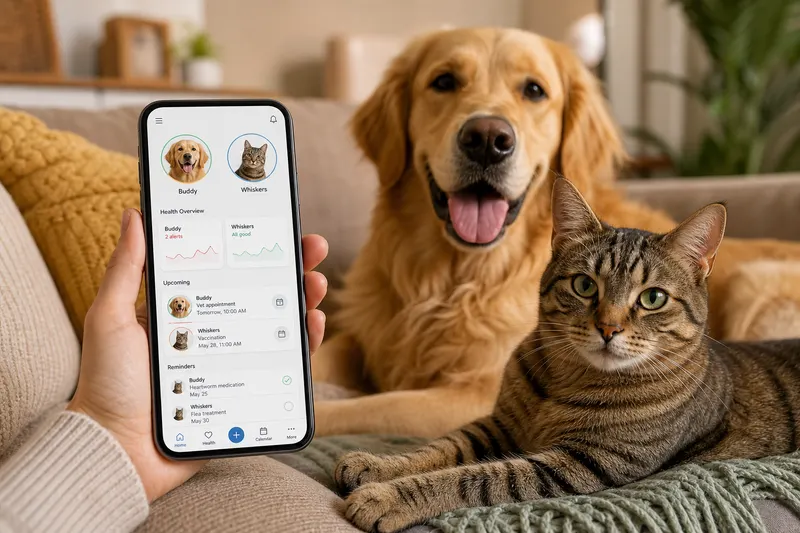
Best Pet Health Tracker App Features to Look For in 2026
Searching for a pet health tracker app in 2026 can feel like comparing apples to oranges. Some apps focus on reminders, others on medical records, and others on “cute logs” that don’t help when you’re actually worried. If you want the best pet app 2026 for real life, you need a tool that supports three moments: routine care, “something feels off,” and emergencies.
This guide walks through what to look for, how to evaluate options, and how to set up your tracker so it becomes useful (not just another icon on your phone).
Why this matters
Health problems are often pattern problems. Vets diagnose faster when you can answer: - When did it start? - How often does it happen? - What changed before it began?
A strong tracker also reduces administrative stress by keeping documents and dates accessible for boarding, travel, and new clinics. PetClues is built as a pet health tracker app with medical records storage, vaccination reminders, an emergency passport, and daily check-ins-so the data you track is actually actionable.
What the best pet health tracker app should do
1) Store medical records and proof
Look for: - PDF/photo upload - Easy retrieval by type (vaccines, lab results, invoices) - Sharing options for sitters, family, and clinics
If this is your main goal, start with organize pet medical records.
2) Handle vaccination and preventative schedules
Your app should support: - Vaccine due dates and booster cycles - Monthly preventatives (heartworm, flea/tick) - Reminders that are easy to confirm and reschedule
Relevant guides: - puppy vaccination schedule - heartworm prevention schedule - flea tick prevention
3) Track symptoms with a simple daily check-in
Avoid apps that require essays. The best trackers capture: - Appetite - Energy - Stool quality - Itching/coughing/vomiting episodes - Notes on triggers
This is where PetClues stands out: daily check-ins are designed to be fast and consistent so you can build trend evidence without burnout.
4) Support medication schedules
A real tracker needs: - Medication list - Dose timing reminders - Refill reminders - A log of doses given
5) Provide emergency-ready information
Your tracker should quickly surface: - Med list - Allergies - Conditions - Vet contacts - Microchip ID
Build this using pet emergency information.
Step-by-step: evaluate and set up your app
- Decide your top use case: records, reminders, symptom tracking, or all three.
- Add one pet completely: profile, photo, microchip, primary vet contact.
- Upload three key documents: - Rabies certificate - Last invoice - Current prescription
- Create three reminders: - Next vaccine due - Monthly preventative - Any daily medication
- Run daily check-ins for 14 days to build the habit.
If an app makes step 5 too hard, you won’t use it long-term-no matter how pretty it is.
What to avoid (common pitfalls) - Reminders without logging (you can’t tell if it was done) - No document storage (you end up back in email) - No sharing/export (hard to switch clinics or share with sitters) - Too many fields (burnout after week one)
Why this matters (real life pet parent scenarios)
Choosing a tracker matters most in three moments: - Routine admin pressure: a daycare asks for rabies proof in 10 minutes and you need the PDF now. - The “something feels off” week: your pet has intermittent vomiting or itching and you can’t remember if it’s once a week or once a day. - An urgent situation: a sitter is heading to an emergency clinic and needs current meds, allergies, and your consent plan.
The best pet app 2026 is the one that makes those moments simpler. If an app only logs “cute milestones” but can’t produce a medication list or a vaccine certificate quickly, it won’t help when you need it.
Step-by-step: set up your tracker like a clinician would
To make your pet health tracker app genuinely useful, structure your setup around decisions:
Step 1: create your “core profile”
Include: - Microchip ID and registry notes - Primary vet and emergency vet - Baseline weight and diet
Microchip info is easy to forget; see microchip registration.
Step 2: build three timelines
- Prevention timeline: vaccines + monthly preventatives
- Medication timeline: daily meds + as-needed meds + refills
- Symptoms timeline: short daily check-ins and “events”
These timelines map to real vet decisions. They also make it easier to prepare for boarding and travel: - pet boarding preparation - traveling with pets
Step 3: define “event logging” rules
To avoid overtracking, decide what counts as an event: - Vomiting episode (time + what was eaten) - Diarrhea day (frequency + any new treats) - Itching flare (location + severity) - Missed medication dose
If allergies are a common issue, pair this with pet allergy tracker.
Common mistakes when choosing a tracker - Picking an app that can’t store and share documents (you still scramble for PDFs) - Using reminders without confirmations (you can’t prove if something happened) - Tracking too many metrics and abandoning the habit after a week - Not keeping medications and last dose times updated - Not having a single “emergency summary” view - Using multiple apps for the same task (more confusion, not less) - Forgetting to include a backup caregiver in your sharing plan
What veterinarians recommend (expert tracking tips)
Vets typically don’t need perfect data-they need reliable patterns: - Consistency beats detail: a daily 30-second check-in is more useful than one long note a month. - Track timing: when symptoms happen matters as much as what happens. - Bring a summary: “vomiting 3 times in 7 days, always after treats” is actionable. - Keep medication accuracy: exact names, doses, and last dose times prevent errors.
PetClues is designed around this clinician-friendly structure: records storage, vaccination reminders, medication reminders with logs, daily check-ins, and an emergency passport you can share quickly.
FAQ
What makes the best pet app in 2026?
The best app is one that combines records, reminders, and simple tracking in a way you’ll use consistently, with easy sharing for vets and caregivers.
Do I need a pet health tracker app if my vet has a portal?
Portals are helpful but often fragmented across clinics. A tracker app centralizes records from multiple sources and adds reminders and daily check-ins.
What should I track daily?
Keep it short: appetite, energy, stool quality, and any symptoms. Consistency is more valuable than detail.
How does PetClues help in an emergency?
It keeps an emergency passport-style summary with meds, allergies, and contacts alongside documents like vaccine proof, making it easier to share accurate information quickly.
Can a tracker help with weight management?
Yes. Pair routine tracking with dog weight tracker and consistent feeding/walk notes.
What’s the first thing to upload?
Rabies certificate and the most recent invoice or visit summary-these usually contain the most useful identifiers and dates.
What should an emergency-ready section include?
Current meds and last dose time, allergies, key conditions, microchip ID, vet contacts, and your consent plan. Use pet emergency information.
How do I keep tracking from becoming overwhelming?
Limit daily tracking to a few fields (appetite, energy, stool, symptoms). Add event notes only when something changes.
How can I share records with a sitter or family member?
Use a single shareable packet: emergency summary, medication list, and vaccine proof. Start with pet sitter instructions.
How often should I review the data?
Weekly for symptom patterns and monthly for prevention/medication adherence. The goal is trend awareness, not daily analytics.